
OCR vs OCV: A Practical Guide to Character Reading and Print Verification in Manufacturing

Matt Wilton
Director
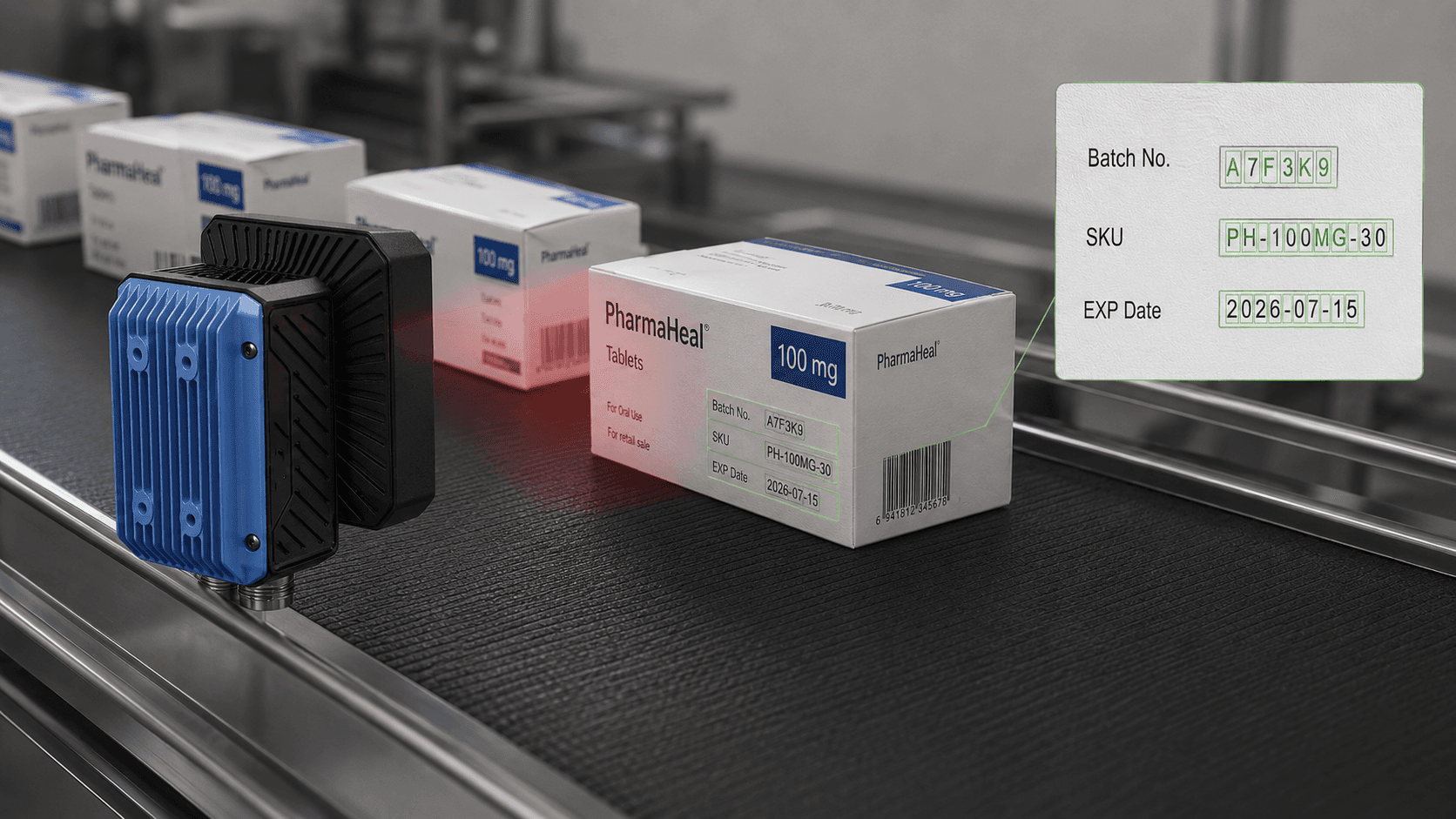
Table of contents
Share
A printed code can look simple.
A date. A batch number. A serial number. A few characters on a box, label, pouch, cable, plastic moulding or machined part.
On a production line, that small printed detail can decide whether a product is accepted, rejected, traced, recalled, shipped or held for investigation.
This is where OCR and OCV are often confused.
They sound similar. They are related. They are not the same job.
For manufacturers, the difference is practical: OCR reads characters. OCV verifies that the characters are correct, present and acceptable.
Both can be useful. Choosing the wrong approach can create false rejects, missed defects, poor traceability and a lot of unnecessary operator arguments at the end of the line.
What is OCR?
OCR stands for Optical Character Recognition.
In manufacturing, OCR uses a camera and image-processing software to read human-readable characters from a product, package, label or component.
Typical examples include:
expiry dates
batch numbers
lot codes
serial numbers
printed labels
laser-marked text
engraved characters
dot-peen marks
inkjet-printed production codes
thermal transfer print on packaging
The purpose of OCR is to convert what the camera sees into usable text or data.
For example, a machine vision system may read:
EXP 12/2027
LOT A2479
SN 83920477
The system can then compare that reading with a recipe, database, production order, label file or expected batch record.
OCR is useful when the character content changes. That could be every batch, every production run, every product variant or every individual item.
What is OCV?
OCV stands for Optical Character Verification.
OCV is not just trying to read the text. It is checking whether the printed or marked characters are correct and acceptable.
A good OCV system can help verify:
the right characters are present
the code is in the correct position
the print is complete
the characters are legible
the contrast is acceptable
the print has not smudged, faded or broken up
the date or batch code matches the active production recipe
the label or package carries the correct information before release
This is especially useful where the printed information must be controlled, not merely read once.
For example, a food, pharmaceutical or medical device packaging line may need to confirm that the expiry date is present, correct and readable before the product leaves the line.
Aerospace, defence and precision engineering applications may use similar logic for serial numbers, part identifiers or marked components where traceability has commercial and quality consequences.
OCR vs OCV: the simple difference
The easiest way to separate them is this:
OCR asks: “What does this say?”
OCV asks: “Is this what it should say, and is it acceptable?”
That difference changes the whole inspection design.
OCR is usually focused on recognition. The system identifies characters and turns them into data.
OCV is focused on verification. The system checks that the characters meet a defined expectation.
A practical example:
A carton should be printed with:
EXP 08/2027
An OCR system may read the printed code and return the characters.
An OCV system may check whether the code matches the expected date, whether all characters are present, whether the print quality is acceptable, and whether the carton should pass or be rejected.
That is why OCV is often the more important discussion for quality teams. Reading is helpful. Verifying is where the quality decision sits.
Where OCR and OCV are used in manufacturing
OCR and OCV are widely used wherever human-readable text forms part of product identification, compliance, packaging control or traceability.
Common applications include:
Food and beverage packaging
Expiry dates, best-before dates, batch codes, lot numbers, product variant codes and promotional codes.
Pharmaceutical and medical device packaging
Batch numbers, expiry dates, label text, serial numbers, packaging codes and production identifiers.
Cosmetics and personal care
Small printed codes on bottles, tubes, cartons, labels and flexible packaging.
Electronics and electrical components
Component marks, serial numbers, model codes, connector labels and small printed identifiers.
Cable and connector manufacturing
Cable markings, product IDs, reel numbers, connector orientation text and traceability codes.
Aerospace, defence and precision manufacturing
Part numbers, serialised components, engraved marks, direct part marking and controlled identification.
The common thread is not the industry. It is the need to remove guesswork from production.
Why print verification fails in real factories
Most OCR and OCV problems are not caused by the software alone.
They come from the full inspection environment.
A printed code may be perfectly readable under office lighting and unreliable on a production line. The product may rotate slightly. The surface may be curved, glossy, dusty, flexible, dark, metallic or textured. The print head may drift. Ink may fade. Packaging film may wrinkle. A label may move. Ambient light may change during the shift.
This is why successful OCR and OCV projects depend on more than choosing a camera.
The system must control the image.
That usually means paying close attention to:
lighting angle
lens selection
camera resolution
part presentation
trigger timing
code location
background contrast
print technology
production speed
reject handling
operator workflow
data capture and reporting
A machine vision system cannot verify what it cannot see clearly. The first job is to create a repeatable image. The inspection logic comes after that.
Reading a character is not the same as approving a product
This is an important point.
A system might read a poor-quality code correctly once. That does not mean the code is acceptable for production.
For example, an expiry date may be readable by the inspection system but too faint for customer use. A serial number may be correct but printed in the wrong position. A batch code may be present but partially broken. A label may carry the correct text but belong to the wrong product variant.
A proper print verification system should be designed around the production decision:
Should this product pass?
Should it be rejected?
Should the line stop?
Should the operator be alerted?
Should an image or result be stored?
Should the result be linked to a batch record, PLC, HMI, MES or quality database?
This is where OCR and OCV become part of a wider quality-control workflow rather than a camera bolted above a conveyor.
What a good OCR/OCV system should check
The exact checks depend on the application, but a robust system may need to confirm several things at once.
Content
Does the code match the expected batch, date, serial number, recipe or production order?
Presence
Is the code actually there?
Position
Is the code printed in the correct location?
Legibility
Are the characters clear enough to support the required quality decision?
Completeness
Are any characters missing, broken, blocked or smudged?
Product match
Does the printed information match the product, pack, label or variant being produced?
Reject handling
Can the system reliably reject the failed product without disturbing good product flow?
Data recording
Does the system need to store results, images, time stamps, operator actions or batch-level data?
That final point is often overlooked. If traceability is part of the requirement, inspection data needs to be handled properly from the beginning.
OCR, OCV and traceability
Traceability is not created by reading a code.
Traceability comes from connecting identification, inspection decisions and production records.
For some applications, the requirement may be simple: inspect every pack, reject failures and show the operator a clear pass/fail result.
For others, the system may need to store images, record read values, export inspection results, communicate with a PLC, connect to a database or support batch documentation.
This is particularly relevant for manufacturers serving regulated, export-led or high-value markets.
In UAE and GCC manufacturing, traceability is increasingly part of the conversation across pharmaceuticals, medical devices, food and beverage, electronics, aerospace, defence, packaging and precision engineering. Buyers, auditors and end customers want more than “we checked it”. They want evidence that the check was controlled and repeatable.
OCR, OCV and barcodes are different conversations
OCR and OCV deal with human-readable characters.
Barcodes, QR codes and Data Matrix codes are machine-readable codes.
They can appear on the same product, and in many cases they should be inspected together, but they are not identical inspection tasks.
A package may need:
OCR to read an expiry date
OCV to verify the printed batch code
barcode reading to confirm product identity
Data Matrix verification for serialisation or traceability
label inspection to confirm the correct artwork or language variant
Trying to squeeze all of that into the phrase “code reading” can hide important project requirements.
For this article, the focus is human-readable characters. Barcodes, QR codes and Data Matrix inspection deserve their own guide.
How AIET approaches OCR and OCV projects
AIET does not treat OCR and OCV as a camera-selection exercise.
The useful work starts with the application.
What is being marked?
How is it marked?
Where is the code located?
How much does the product move?
What is the line speed?
What are the acceptable and unacceptable print conditions?
What should happen when inspection fails?
Does the system need to communicate with a PLC, HMI, robot, reject mechanism, database or production system?
Does the customer need image storage, reporting or validation documentation?
Once those points are clear, the correct vision architecture can be selected. That might be a compact smart camera for a straightforward packaging inspection. It might be a PC-based machine vision system for multiple cameras, several inspection steps, recipe control, data handling or more complex production integration.
Where appropriate, AIET can use proven industrial machine vision platforms such as NeuroCheck for OCR/OCV, identification, inspection routines and production integration. The aim is not to force every project onto one platform. The aim is to engineer a system that produces reliable inspection decisions on the real product, at the real line speed, in the real environment.
Practical questions before specifying OCR or OCV
Before investing in an OCR or OCV system, ask these questions.
What exactly needs to be inspected?
A date code, batch number, serial number, label text, product ID or direct part mark may each need a different approach.
Is the system reading, verifying, or both?
This decides whether OCR, OCV or a combined routine is required.
Does the expected code change?
If the printed information changes by batch, recipe or product variant, the inspection system must receive or select the correct reference data.
What are the real failure modes?
Faint print, missing characters, double print, wrong date, wrong label, poor contrast and incorrect position are different problems.
What happens to rejected product?
A vision system is only useful if the failed item is handled properly.
Is traceability required?
If inspection data must be stored or exported, this should be designed at the start rather than patched in later.
Has the actual product been tested?
The awkward sample is usually the one worth testing first.
Common mistakes with OCR and OCV
The first mistake is assuming software can compensate for a poor image.
It cannot do that reliably forever. Proper lighting, optics and part presentation are still essential.
The second mistake is defining the requirement too loosely.
“Read the code” is not enough. The project should define which codes must be read, what counts as acceptable print, what causes a reject, and how false rejects will be handled.
The third mistake is ignoring production variation.
A code that reads perfectly during a demo may behave differently when the line is running, the packaging film changes, the print head warms up or the operator loads a new product variant.
The fourth mistake is forgetting the reject mechanism.
Detection without reliable reject handling is only half a system.
Where this fits for UAE and GCC manufacturers
OCR and OCV are especially relevant where manufacturers need to improve quality control without slowing production.
For UAE and GCC companies working in packaging, food and beverage, pharmaceuticals, medical devices, electronics, cable manufacturing, precision engineering, aerospace supply chains and industrial products, automated print verification can reduce manual checking and improve control over production records.
It also supports a broader shift towards smart manufacturing. Not in a vague dashboard-and-brochure sense, but in the practical sense: inspect more products, apply consistent criteria, record useful data and act quickly when the process drifts.
That is where machine vision earns its keep.
FAQ
What is the difference between OCR and OCV?
OCR reads characters from an image and converts them into text or data. OCV verifies that the printed or marked characters are correct, present, legible and acceptable against a defined requirement.
Is OCR enough for batch code inspection?
Sometimes. If the system only needs to read a changing code, OCR may be suitable. If the system needs to confirm that the right code is present and printed correctly, OCV or a combined OCR/OCV approach is usually more appropriate.
Can machine vision inspect expiry dates?
Yes. Machine vision can inspect expiry dates, batch numbers, lot codes and serial numbers, provided the system has suitable lighting, optics, resolution, part presentation and software logic.
Can OCR read laser-marked or engraved characters?
Yes, depending on the marking quality, surface material, contrast, character size and lighting method. Laser marks, engraved text and dot-peen characters often need careful lighting trials.
What causes OCR errors in production?
Common causes include poor contrast, glare, motion blur, incorrect lighting, small characters, inconsistent printing, curved surfaces, packaging movement, low resolution and changes in product presentation.
Is OCR/OCV only for packaging?
No. OCR and OCV are used on packaging, labels, components, cables, connectors, machined parts, moulded parts and directly marked industrial products.
Should samples be tested before choosing an OCR/OCV system?
Yes. Representative sample testing is one of the best ways to confirm whether the system can handle real print variation, surface conditions, line speed and reject criteria.
Speak to AIET Group
If you are reviewing OCR, OCV, batch code inspection, expiry date verification or print inspection for a manufacturing line, speak to AIET Group.
We can review the application, assess representative samples and help define the correct machine vision approach for your product, process and traceability requirements.


